What is VMS?
VMS (Video Management System) in Cordatus is a comprehensive video management platform that covers everything related to connecting, managing, streaming, and recording cameras. From setting up physical or IP cameras to viewing live streams, scheduling recordings, and managing storage drives, VMS provides enterprise-grade solutions for video surveillance and monitoring.
It unifies the workflow between Cordatus Client and Cordatus Web App, giving users a consistent and powerful interface for real-time video monitoring and automated recording.
Why VMS?
Unlike traditional VMS (Video Management System) solutions, Cordatus VMS operates with a distributed architecture that combines local processing with cloud accessibility. This provides:
- 100% Uptime: Recording and streaming continue uninterrupted even during internet outages
- Low Latency: Instant access since data is processed on local devices
- Cost Savings: Cloud bandwidth and storage costs are minimized
- Data Security: Sensitive data remains in local infrastructure, GDPR compliant
- Flexibility: Works seamlessly on edge devices, servers, and traditional infrastructure
Who is it for?
Security & Surveillance:
- Security teams managing 24/7 continuous monitoring
- Operators conducting post-incident forensic analysis
- Organizations with multi-location centralized monitoring needs
Industrial & Manufacturing:
- Production line tracking and quality control
- Workplace safety documentation
- Process monitoring and compliance recording
Retail & Commerce:
- Store security and loss prevention
- Customer flow analysis and heatmapping
- Checkout and entry point monitoring
Smart City & Infrastructure:
- Traffic monitoring and management
- Parking area surveillance
- Public safety and emergency response
Core Capabilities
| Feature | Description |
|---|---|
| Universal Camera Support | Works with RTSP, HTTP/HTTPS, ONVIF, USB, CSI, and GMSL cameras |
| Local & Cloud Recording | Cloud-independent, direct recording to devices with remote access |
| Smart Storage | Automatic disk management and old recording cleanup |
| Flexible Scheduling | Calendar-based automatic recording scheduling with Cossa AI |
| Infinite Timeline | Access and navigate unlimited historical recordings |
| Multi-View | Simultaneous monitoring of up to 25 cameras (5x5 grid) |
| Live Streaming | Real-time video feeds with adjustable quality and resolution |
| Map Integration | Geographic camera positioning and location-based monitoring |
What can I do with VMS?
Connect Cameras
- Add IP, USB, CSI, and GMSL cameras from either Web App or Client
- Support for RTSP, HTTP/HTTPS, and ONVIF protocols
- Auto-discovery for ONVIF-compliant cameras
- Assign names, groups, and location data for map integration
Stream Cameras
- View real-time camera streams on both Web and Client
- Check FPS, bitrate, bandwidth, and resolution in real-time
- Use Picture-in-Picture, fullscreen, and multi-stream layouts
- Adjust video quality dynamically based on network conditions
Manage Cameras
- Organize cameras into groups and subgroups
- Rename or remove cameras
- Adjust video quality and resolution on the fly
- Monitor camera health and connection status
Record Video
- Start, pause, resume, or delete recordings
- Watch past footage, change playback speed, zoom timelines
- Sync multiple cameras for multi-angle analysis
- Choose between local or external storage directories
Schedule Recordings
- Automate recordings with flexible daily, weekly, or monthly calendars
- Create recurring or one-time recording events
- Manage all schedules with Cossa (Cordatus Smart Scheduling Agent)
- Set up business hours, night security, or custom recording patterns
Add New Drives
- Extend your recording storage via GUI or CLI
- Configure permanent mounts and ensure persistence on reboot
- Set storage thresholds and automatic cleanup policies
System Architecture
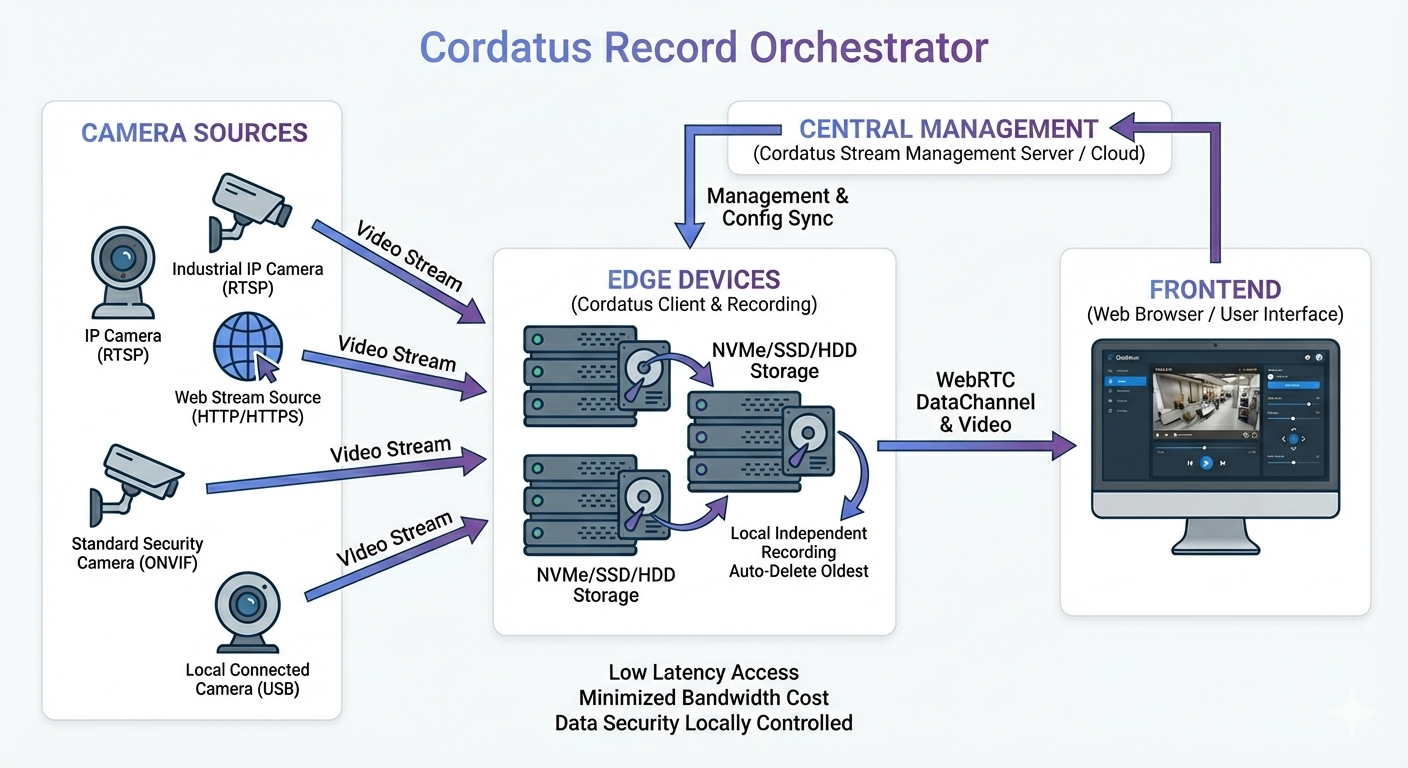
Supported Camera Sources
Cordatus VMS supports various camera protocols for seamless integration with your existing infrastructure:
- RTSP: Industrial IP cameras and professional security systems
- HTTP/HTTPS: Web-based streaming sources and video feeds via API
- ONVIF: Standard-compliant security cameras (auto-discovery support)
- USB: Locally connected cameras and webcams
- CSI & GMSL: Direct camera module integration for edge devices
Distributed Recording Architecture
Recordings are stored directly on devices, independent from the cloud. Works on both edge devices and traditional servers. This architecture provides:
- Uninterrupted Recording: Recording continues even when internet connection is lost
- Low Latency: Instant access and fast playback startup
- Bandwidth Optimization: Transfer to cloud only when necessary
- Data Sovereignty: Recordings are securely stored in local infrastructure
Smart Storage Management
NVMe, SSD, or HDD can be used on recording devices. The system automatically:
- Monitors disk usage in real-time
- Cleans up oldest recordings when threshold is reached
- Protects critical recordings
- Reports storage health
You can configure how the system should behave when storage space becomes low:
- Delete old files: Automatically remove older recordings to free up space
- Stop recording: Automatically stop when threshold is reached
Key Concepts
- Camera — A video input source (IP, USB, CSI, or GMSL).
- Group / Subgroup — Organizational structure for managing cameras.
- Stream — Live video feed displayed in Cordatus.
- Recording — Saved camera footage, viewable later from the Watch page.
- Schedule — Automated recording task with time and recurrence settings.
- Drive — A storage location where recordings are saved.
- Cossa — The agent responsible for handling all schedule operations every minute.
How it works
- Connect cameras via the Web App or Client.
- Organize them using groups and add locations for map visibility.
- Stream live feeds directly in Cordatus and view stream details.
- Record videos manually or automatically based on schedules.
- Store recordings in local or external drives with customizable thresholds.
- Access and review recordings anytime through the Watch tab.
- Manage everything centrally from Cordatus Web or Client for full control.